
TL;DR: HTTP security headers are a simple but effective way to harden your website against common attacks like XSS, clickjacking, and code injection. This post explains the key headers -- X-Frame-Options, X-XSS-Protection, Content-Security-Policy, Referrer-Policy, and more -- with a practical example of configuring them in a Netlify
_headersfile. You can check your current score at securityheaders.com and aim for an A rating.
How To Use Security Headers
With HTTP response headers, you can harden your website security and also prevent/mitigate attacks
Thanks to HTTP security headers, it is possible to be a few steps ahead, ensuring the security of our sites, our users and our data
HTTP security headers protect you against the types of attacks that your site is most likely to come across. These headers protect against XSS, code injection, clickjacking, etc.
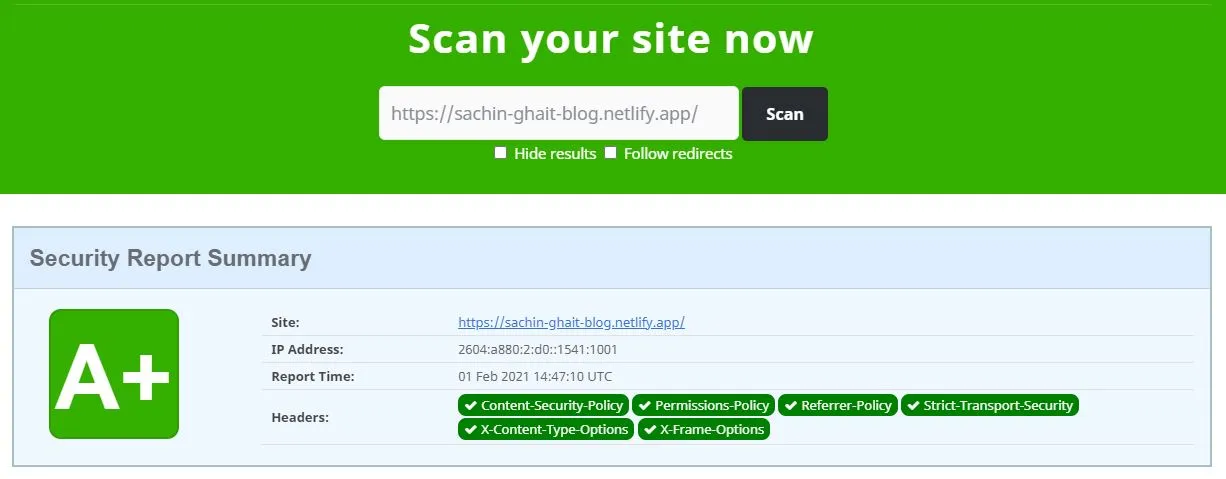
You can check the score for your website's headers on securityheaders.com.
If you have A in the score, then you are doing good. For other scores securityheaders will suggest what things can be added.
How do I add security headers on Netlify?
For hosting my site on netlify I have added headers as below
[[headers]]
  for = "/*"

  [headers.values]
    X-Frame-Options = "DENY"
    X-XSS-Protection = "1; mode=block"
    Content-Security-Policy = "script-src 'self'"
    Referrer-Policy = "same-origin"
    Permissions-Policy = "fullscreen=(), geolocation=()"
    X-Content-Type-Options = "nosniff"

    cache-control = '''
    max-age=0,
    no-cache,
    no-store,
    must-revalidate'''
Some important headers to set are Content-Security-Policy, Permissions-Policy, Referrer-Policy, Strict-Transport-Security
"Content Security Policy (CSP) is a feature that helps to prevent or minimize the risk of certain types of security threats." — MDN Web Docs
More explanation can be found in the Additional Information section at securityheaders.com.
What score did I get after adding the headers?
This is the score after adding all required security headers
Which security headers matter most?
| Header | What it does | Example value |
|---|---|---|
Strict-Transport-Security | Tells browsers to use HTTPS only for your site | max-age=31536000; includeSubDomains |
Content-Security-Policy | Limits where scripts, styles and frames can load from, which mitigates XSS | default-src 'self' |
X-Content-Type-Options | Stops the browser guessing a file's type | nosniff |
X-Frame-Options | Blocks your page from being framed (clickjacking). The CSP frame-ancestors directive is the modern replacement | DENY |
Referrer-Policy | Controls how much URL information is sent to other sites | strict-origin-when-cross-origin |
Permissions-Policy | Turns browser features such as camera or geolocation on or off | camera=(), microphone=(), geolocation=() |
Test a new Content-Security-Policy with the Content-Security-Policy-Report-Only header first. It reports violations without blocking anything, so a strict policy doesn't break your site on day one.
How do I add security headers on Cloudflare Pages?
This blog now runs on Cloudflare Pages instead of Netlify. Pages reads a plain-text _headers file from your build output folder (for this blog, dist). Add rules like these to it. If your framework already generates that file, as Nuxt does for its cache rules, merge these lines into the generated file instead of creating a second one:
/*
  X-Content-Type-Options: nosniff
  X-Frame-Options: DENY
  Referrer-Policy: strict-origin-when-cross-origin
  Permissions-Policy: camera=(), microphone=(), geolocation=()
  Strict-Transport-Security: max-age=31536000; includeSubDomains
The Netlify example above is the setup I used when this post was first written.
Frequently Asked Questions
What do HTTP security headers protect against?
They tell the browser to block risky behaviour. X-Frame-Options: DENY stops your page loading inside an iframe (clickjacking). Content-Security-Policy limits where scripts can load from (XSS). X-Content-Type-Options: nosniff stops the browser guessing file types.
Do I still need X-XSS-Protection?
Mostly no. MDN marks it as non-standard, and modern browsers no longer ship the XSS filter it controlled. A strong Content-Security-Policy is the recommended replacement.
What value should I use for Strict-Transport-Security?
A common value is max-age=31536000; includeSubDomains. 31,536,000 seconds is one year. Only add it once every page and subdomain works over HTTPS, because browsers will refuse plain HTTP for that whole period.